
Download Shoots by Diktatorial – AI Selfie Art Generator for Musicians
Overview
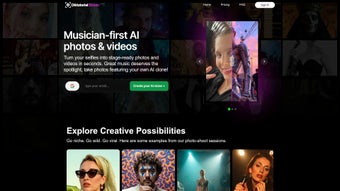
Shoots by Diktatorial is a cutting‑edge, web‑based AI art generator that was built from the ground up for musicians, bands, and independent artists who need eye‑catching visual content without the steep learning curve of traditional graphic‑design software. By leveraging deep‑learning models trained on millions of artistic styles—from classic oil‑painting brushwork to modern glitch‑aesthetic distortions—the platform can turn a simple selfie into a high‑resolution album cover, a striking promotional still for a music‑video teaser, or a distinctive profile picture that instantly conveys an artist’s brand personality. Because the entire engine runs in the cloud, users never have to download bulky installers or worry about GPU compatibility; any device with a modern browser can access the service, whether it’s a Windows laptop in a studio, a macOS desktop at home, a Linux workstation, an Android phone on tour, or an iPad in the green room.
The subscription model provides continuous access to a growing library of styles, regular updates that reflect emerging visual trends, and priority rendering on the platform’s high‑performance servers. Shoots also includes batch‑processing capabilities, allowing artists to apply a single style to an entire set of selfies in one click—perfect for creating cohesive visual campaigns across social‑media platforms, streaming services, and merchandise. Security is baked in: all uploads are encrypted via HTTPS, processed in memory, and automatically purged after 24 hours, ensuring that creators retain full ownership of their generated assets while protecting their raw media from unwanted exposure.
In short, Shoots by Diktatorial merges the power of AI with a musician‑first workflow, delivering professional‑grade visuals in seconds, anywhere, anytime.
Features & Installation Guide
Shoots by Diktatorial packs a robust set of features while keeping the onboarding process intentionally simple. Below is a detailed look at what the platform offers, followed by a step‑by‑step guide to getting started from any device.
- AI‑driven artistic filters specifically curated for music‑related branding, including vintage vinyl, neon‑wave, glitch‑pixel, and hand‑painted portrait styles.
- Fully web‑based architecture—no downloads, no installations, no updates to manage.
- Batch processing mode: upload up to 50 selfies, apply a single style, and receive a ZIP archive of high‑resolution results.
- High‑resolution export options (up to 6000 × 6000 px) suitable for print, digital ads, and streaming‑service thumbnails.
- Secure, subscription‑based access with a 7‑day free trial and two pricing tiers (monthly Artist at $9.99, annual Pro at $99.99).
- One‑click social sharing to Instagram, TikTok, YouTube, and Spotify, complete with automatically sized thumbnails.
- Customizable color palettes, texture overlays, and intensity sliders for fine‑tuning each output.
- Responsive UI that adapts to desktop, tablet, and mobile screens, ensuring a consistent experience across Windows, macOS, Linux, Android, and iOS.
- Developer‑friendly API with SDKs for JavaScript, Python, and Ruby, enabling integration into custom music‑promotion pipelines.
- GDPR‑ and CCPA‑compliant data handling, with encrypted transfers and automatic deletion of source files after 24 hours.
Installation & First‑Time Use
1. Open your preferred browser. Shoots supports Chrome, Firefox, Safari, Edge, and Opera on any modern operating system.
2.
Navigate to the official website. Enter https://shootsbydiktatorial.com and click “Start Free Trial.”
3. Create an account. Provide a valid email address, choose a strong password, and confirm via the verification link sent to your inbox.
4.
Select a subscription plan. You may begin with the free trial; once it expires, choose either the monthly or annual plan.
5. Upload your selfie. Drag‑and‑drop a JPEG, PNG, or HEIC file into the upload zone, or use the “Browse” button to locate the image on your device.
6. Choose a style. Browse the style gallery, hover to see a live preview, and click to apply.
7.
Adjust parameters. Use the sliders for intensity, hue, and texture depth to match your brand’s aesthetic.
8. Generate and download. Click “Generate.” Within seconds, the AI renders a high‑resolution image ready for download or direct social sharing.
9. Batch mode (optional). Select multiple files, apply a single style, and download a ZIP file containing all processed assets.
10.
Explore the API. For developers, the “Developers” tab provides authentication keys, endpoint documentation, and sample code snippets.
Compatible with all major operating systems via web browsers: Windows 10/11, macOS 10.15+, Linux distributions with recent browsers, Android 8.0+, and iOS 13+.
Pros & Cons
Pros
- Instant AI rendering eliminates long export queues, delivering results in seconds.
- Web‑based platform removes the need for heavy installations or periodic updates.
- Extensive library of music‑focused artistic filters keeps branding fresh and relevant.
- High‑resolution output meets professional printing and digital‑media standards.
- Secure subscription model ensures regular feature upgrades and priority server access.
- Batch processing dramatically speeds up large‑scale promotional campaigns.
- Responsive design works flawlessly on desktop, tablet, and mobile devices.
- API access empowers developers to embed AI transformations into custom workflows.
- GDPR‑compliant data handling protects user privacy and intellectual property.
- Free 7‑day trial allows users to evaluate the service risk‑free.
Cons
- Requires a constant internet connection; offline usage is not supported.
- Subscription cost may be a barrier for hobbyist musicians or students.
- Optimized for selfie‑type portraits; full‑body or landscape images may produce suboptimal results.
- Advanced manual editing (e.g., brush‑stroke control) is unavailable; users rely on preset styles.
- No native desktop application for Windows or macOS, limiting workflow integration for some studios.
Frequently Asked Questions
Is Shoots by Diktatorial free to use?
Yes, you can start with a 7‑day free trial that unlocks all styles and features. After the trial, a paid subscription is required to continue using the service.
Can I use the generated images for commercial purposes?
Absolutely. Once an image is downloaded, you own full commercial rights, allowing you to use it for album covers, merchandise, advertising, and any other promotional material.
What file formats are supported for upload and download?
Uploads accept JPEG, PNG, and HEIC. Downloads are available in high‑resolution JPEG or PNG, with an optional TIFF export for Pro‑plan users.
How secure is my data on the platform?
All file transfers are encrypted with HTTPS, and uploaded images are automatically deleted from the servers after 24 hours. Shoots complies with GDPR and CCPA privacy regulations.
Do I need any special hardware to run the AI engine?
No special hardware is needed. Because processing occurs in the cloud, any device capable of running a modern web browser—including low‑end smartphones—can generate AI‑enhanced images.
Conclusion & Call to Action
Shoots by Diktatorial fills a clear gap in the music‑promotion toolkit: a fast, AI‑powered solution that converts everyday selfies into professional‑grade visual assets without the steep learning curve of Photoshop or the hardware demands of traditional rendering software. Its web‑first design ensures that creators can start producing instantly from any device, while the subscription model guarantees a steady stream of fresh, music‑centric styles that keep an artist’s brand looking contemporary. Though the need for an internet connection and the recurring cost might deter some casual users, the advantages—high‑resolution outputs, batch processing, secure cloud handling, and an intuitive interface—make it a compelling investment for serious musicians, managers, and label teams. If you’re ready to elevate your visual identity, boost engagement across Instagram, TikTok, and streaming platforms, and create eye‑catching album artwork in minutes, click the button below to launch your free trial. Experience the power of AI artistry tailored specifically for musicians and watch your selfie transform into a statement piece that resonates with fans worldwide.



.png)



